Messages - SMS Text Message
- 4.0
- Rating
- 500.00K
- Installs
- Free
- Price

 Analysis by App-foxy
When I need a straightforward way to handle ordinary text conversations, I prefer an app that gets me from a new message to a clear reply without making the process feel heavier than it needs to be. Messages - SMS Text Message takes that practical approach. It is a free communication app from Fronex Lab, built around SMS conversations while adding useful touches such as scheduled messages, group chats, and smart features.
I tested it with the kind of routine that exposes whether a messaging app is genuinely convenient: answering short personal messages, organizing a group exchange, preparing a reminder in advance, and moving between individual and shared conversations. My impression is positive, but not uncritical. This is a useful choice for people who want more control than a very basic texting tool provides, although it is not automatically the best replacement for every messaging service.
From an incoming text to a finished conversation
I find the most useful way to judge this part of the experience is to look beyond how quickly I can type: the message also needs to reach the right person with its meaning intact. For scheduled texts, I make the timing and wording concrete before I step away, so a later change in plans is less likely to turn a convenient reminder into a confusing one.
You May Also Like

 Blood Strike: 2.5 Anniversary
Blood Strike’s Loadouts Turn Every Drop Into a Tactical Gamble
A close look at Blood Strike’s custom loadouts: how fast access to signature weapons reshapes its battle royale rhythm, rewards preparation, and narrows the gap between fights.

 Pandora - Music & Podcasts
Pandora’s Music Is Easy to Start, but Harder to Recover
Pandora’s strength is its low-effort path from a seed to a station. Its weak spot is how much confidence it asks you to place in connection, setup, and quiet recovery.

 8 Ball Pool
 Is Built on Rivalries, Rematches, and Routine
A close look at the rivalries, rematches, shared routines, and unanswered safety questions that turn a quick pool match into a persistent mobile community.

 Samsung Music
’s Quiet Strength Is Playing What You Already Own
Its reach comes less from spectacle than from dependable access to a personal library. That simplicity is both the app’s strongest retention engine and its ceiling.

 AccuWeather: Weather Radar
AccuWeather Review: A Quick, Clear Forecast for Everyday Decisions
For everyday plans, the best forecast is the one you can understand quickly. AccuWeather makes rain timing, radar, and local conditions easy to act on, with a few trade-offs.

 Hill Climb Racing
Why Hill Climb Racing Still Turns Crashes Into One More Run
A tiny car, a bumpy hill and one more upgrade: Hill Climb Racing keeps resurfacing because its simple chaos makes every near-miss feel personal.
More From Our News Desk



Starting with the right kind of message
The app makes the most sense when the conversation begins with a normal SMS rather than a media-heavy chat. That distinction matters. SMS is still useful for reaching people who do not share the same chat platform, for handling practical arrangements, or for keeping a message simple and broadly accessible. In those situations, the familiar conversation format is more valuable than a crowded collection of social features.
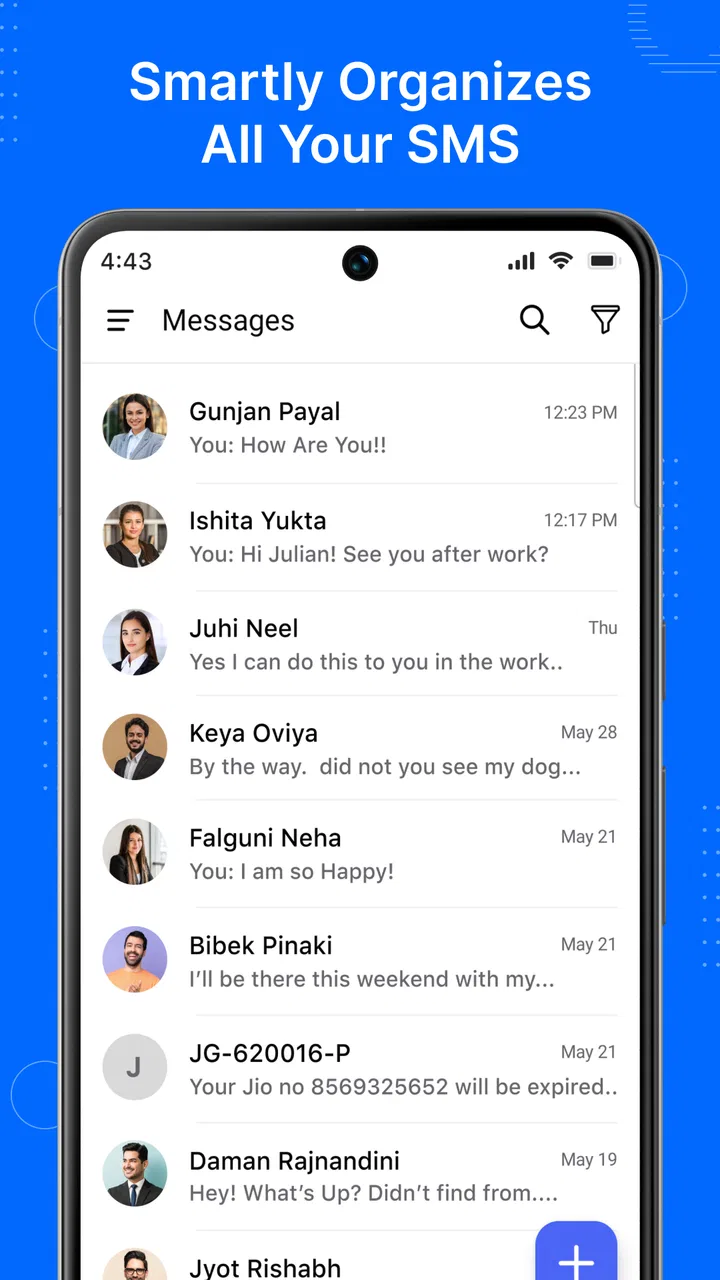
On opening the app, I found the experience easy to understand because the main task remains visible: choose a conversation, read the latest exchange, and write a response. That directness will appeal to anyone who finds some modern communication apps distracting. The interface does not need to turn a two-line update into a complicated social event.
The app is aimed at a broad audience, and its Everyone age rating reflects that approachable positioning. It runs on Android devices using version 6.0 or later, which makes it relevant to people who keep an older phone instead of upgrading frequently. That compatibility can be helpful in a household where not everyone uses a recent device.
Writing a reply without losing the thread
For a normal one-to-one exchange, the useful test is not whether the app can display a message. Nearly every messaging tool can do that. The important question is whether I can quickly understand who wrote what, decide what needs an answer, and send the reply without accidentally switching to another conversation.
Here, the conversation-first layout works well for short exchanges. I can treat the thread as a running record rather than a temporary notification. That is especially useful for practical details such as an address, a meeting time, or a delivery update. Instead of relying on memory after dismissing a notification, I can return to the thread and check the context.
One small but meaningful habit is to use the conversation history as a checklist. If somebody sends several separate questions, I can answer them in order and avoid replying only to the easiest one. This is not a flashy feature, but it is the kind of workflow improvement that makes a basic texting app feel more dependable during a busy day.
Scheduling a message for the moment it will be useful
Scheduling is the feature that most clearly separates this app from a minimal SMS tool. I found it useful when the message was already clear but the timing was not right. For example, I might want to remind a family member about an early appointment without disturbing them late at night, or prepare a work-related update before I forget it.
The best way to use scheduling is to treat it as a two-part check. First, write the message as if it were being sent immediately. Then read it again with the future recipient and timing in mind. A message that makes sense now may sound vague later, particularly if it contains words such as “tomorrow,” “later,” or “this afternoon.” Replacing those with a specific day or time makes the scheduled handoff less ambiguous.
I also recommend reviewing the recipient before confirming the schedule. This is a simple safeguard, but it matters more when a message is prepared in advance because there is less chance of catching a mistake at the moment it leaves. Scheduling saves attention, but it also shifts responsibility earlier in the process.
There is a trade-off here: a scheduled SMS is convenient for reminders and routine updates, but it is not a substitute for a live conversation. If the subject is urgent, sensitive, or likely to change, sending immediately or calling is safer. I would use the feature for predictable communication, not for anything that depends on a last-minute response.
Moving from one person to a group
Group chat is another practical step in the workflow. It helps when the same information needs to reach several people, such as coordinating a pickup, confirming plans with relatives, or organizing a small event. The advantage is obvious: I can prepare one message instead of repeating the same text across multiple individual threads.
However, a group exchange also changes the communication burden. A short message can become noisy when several people respond separately, and an important answer can disappear among casual replies. I found it helpful to make the first group message specific: state the decision needed, include the relevant time or place, and ask people to respond in a way that is easy to scan.
This is one of the less obvious ways to get better results from the app. Group messaging works best when the sender acts like an organizer rather than simply broadcasting a question. A message such as “Can everyone make it?” may produce scattered replies. A message that names the options and asks for a clear choice gives the conversation a better chance of reaching an outcome.
Using smart features without handing over judgment
The app also presents smart features as part of its communication toolkit. I see those features as assistance rather than a replacement for personal review. They can be useful when I already know what I want to say but need help making the message more concise or organized. They are less suitable when the wording needs a personal tone or when a small change in meaning could cause confusion.
My practical advice is to use any smart assistance as a draft stage. Read the result from the recipient’s point of view, remove anything that sounds too formal for the relationship, and check names, dates, and commitments yourself. A polished sentence is not automatically an accurate sentence.
This approach also makes the feature more valuable for people who struggle to turn a rushed thought into a clear text. I can start with the essential facts, refine the wording, and still keep control over what is actually sent. The benefit is not that the app thinks for me; it is that it can reduce the effort between an idea and a usable message.
Handling the handoffs between people and devices
Every messaging workflow has handoffs. A message moves from the sender’s phone to the recipient, and the conversation may then continue through another device or another communication app. SMS has an important advantage at this stage: it is not limited to contacts who use the same branded service. That makes it practical for mixed groups where some people prefer different platforms.
At the same time, this is where expectations need to stay realistic. An SMS-centered app should not be judged as though it were a full internet messenger. People who depend on rich media conversations, extensive reactions, large file sharing, or platform-specific communities may find a dedicated chat service more suitable. The strength here is reach and simplicity, not an unlimited feature set.
For a group that includes people with different phones or messaging habits, I would establish the communication rule before sending important information. If the group needs a quick text confirmation, this app is a sensible fit. If it needs a shared document, detailed photo discussion, or a persistent project space, another service will probably handle the handoff better.
What the completed workflow feels like
A successful session with the app ends with a clear result: the right person receives a readable message at the right time, or a group has enough information to make a decision. That sounds basic, but it is exactly where a communication app should earn its place.
In an everyday example, I could receive a message asking whether a family member needs a ride, answer the immediate question, create a group conversation for the other people involved, and schedule a reminder for the morning. Each action solves a different part of the same problem. The individual reply handles the present moment, the group chat shares coordination, and the scheduled message protects against forgetting.
The workflow is strongest when the communication is short, practical, and time-aware. It helps me separate what needs an answer now from what can be prepared for later. That separation reduces the temptation to keep every conversation open in my head throughout the day.
For people deciding whether to install it, the basic question is therefore not simply whether it can send texts. It is whether scheduling, group handling, and smart drafting address a real problem in their routine. If those features match the way you communicate, the app offers more flexibility than a bare SMS interface while remaining easier to approach than a large social platform.
Where the flow breaks down
The first point of friction is that SMS remains a relatively limited foundation. The app can make the experience more organized, but it cannot turn every text exchange into a rich, modern chat environment. If your conversations depend heavily on media, live collaboration, or a broad ecosystem of connected services, you may feel constrained after the initial convenience wears off.
The second issue is the responsibility that comes with scheduling. A scheduled message can be forgotten after it has been prepared, and a changed plan can make it inappropriate. I would not schedule something important and then assume the app removes the need to check the situation. The feature is useful precisely because it automates timing, but automation requires a careful setup.
Group chat can also break down through unclear ownership. When several people receive the same message, everyone may assume somebody else will act. I get better results when I name the person responsible or ask for a direct confirmation. This is a communication habit rather than an app setting, but it determines whether the group feature produces action or just more notifications.
The smart tools have a similar limitation. A suggestion can improve structure, yet it may not understand the relationship between the people involved or the emotional importance of a sentence. I would never send an automatically polished message without checking the tone. For a sensitive apology, a family disagreement, or a delicate work request, my own wording is more important than speed.
There is also a question of switching habits. If your contacts already live in another messaging service, installing a separate SMS app may not change how they communicate with you. The app is most useful when you regularly need traditional texting, want a more organized workflow, or communicate with people who are not gathered in one shared platform.
Who should choose it, and who should look elsewhere
I would recommend this app to someone who wants a free, approachable texting tool with more planning support than a basic messenger. It suits people who send reminders, coordinate small groups, or frequently need to prepare messages before the ideal sending time. It is also a reasonable option for users with older Android hardware because the minimum operating system is Android 6.0.
It may be particularly helpful for a busy parent, a person managing several practical appointments, or anyone who uses SMS to communicate across different phone types. The combination of ordinary texting and scheduled messages can reduce small memory tasks that otherwise accumulate during the day.
I would point someone toward a richer internet messenger instead if their priority is high-volume media sharing, elaborate group collaboration, or a conversation space where everyone already participates. I would also suggest staying with a familiar default app if changing tools would create confusion without solving a real problem. A new interface is worthwhile only when its workflow improvements are noticeable in daily use.
How the app stands among familiar alternatives
Compared with a very basic SMS application, this one has a clearer reason to exist: scheduling, group conversations, and smart assistance give me more ways to prepare and organize messages. Compared with a full-featured internet messenger, it is more focused and less dependent on everyone joining the same platform. Those are different advantages, not competing promises.
The choice comes down to the handoff you need. If the message must reach a broad range of phone users through ordinary texting, this app is practical. If the conversation needs a shared online space with richer interaction, a dedicated internet service is likely the better destination. I would not choose one universally; I would choose based on whether reach or depth matters more for the conversation.
Its rating of 4.1 from around 2.2 thousand ratings suggests that many users find the balance worthwhile, while the total of over 100 thousand installs shows that it has attracted a meaningful audience. I treat those figures as useful context rather than a guarantee. My own decision would still depend on how often I schedule messages and whether my contacts actually communicate through SMS.
My recommendation after following the full process
Fronex Lab has built a communication app that is easiest to appreciate through a complete routine rather than a quick glance. Start with an incoming text, answer it in context, move related people into a group when coordination is needed, prepare a future reminder, and review any smart suggestion before sending. That sequence shows where the app adds value.
The current version, 11.0, feels aimed at users who want ordinary texting to be a little more deliberate. It does not remove the limitations of SMS, and it cannot replace every kind of chat service. Still, it gives everyday messages a more useful workflow without charging for the core app.
My final view is that this is a good practical choice when timing, reach, and simple coordination matter more than rich online features. I would install it for reminders, family logistics, and mixed-contact communication, while keeping a different service for media-heavy or collaborative conversations. If that matches your routine, Messages - SMS Text Message is worth trying; if not, its extra tools may simply add another place to manage messages.
FAQs for Messages - SMS Text Message
01What features does the Messages - SMS Text Message app offer?
The Messages - SMS Text Message app provides a range of features including group messaging, multimedia sharing, emojis, and stickers. It also supports quick replies, message scheduling, and customizable themes. Users can take advantage of a secure chat environment with end-to-end encryption for privacy protection.
02Is the Messages app compatible with both Android and iOS devices?
Yes, the Messages - SMS Text Message app is available for both Android and iOS platforms. Users can download it from the Google Play Store or the Apple App Store. The app is optimized for smooth performance on a wide range of devices with different operating systems.
03How secure is the Messages - SMS Text Message app?
Security is a priority for the Messages app. It uses end-to-end encryption to ensure that all messages remain private between the users. This means that only the sender and receiver can read the messages, and not even the app developers can access this content.
04Does the app support multimedia messaging?
Yes, the Messages - SMS Text Message app supports multimedia messaging, allowing users to send and receive photos, videos, and voice messages. This feature is designed to enhance communication by making it more dynamic and interactive, catering to modern messaging needs.
05Are there any customization options available in the Messages app?
The Messages app offers several customization options for a personalized experience. Users can change themes, set custom notification tones, and use a variety of emojis and stickers. These features allow users to tailor the app's appearance and functionality to suit their preferences.
Pros
- Simple and intuitive interface.
- Supports multimedia messaging.
- Group chat functionality.
- Quick message search feature.
- Customizable notifications.
Cons
- Lacks end-to-end encryption.
- Limited customization of themes.
- No built-in spam filter.
- Could use more emoji options.
- Occasional delivery delays.

Messages - SMS Text Message
Gallery